Every day
Transactions
Every transaction from every connected account, with its category and how it got there. This is where you look something up, fix a category, or take something out of the books.
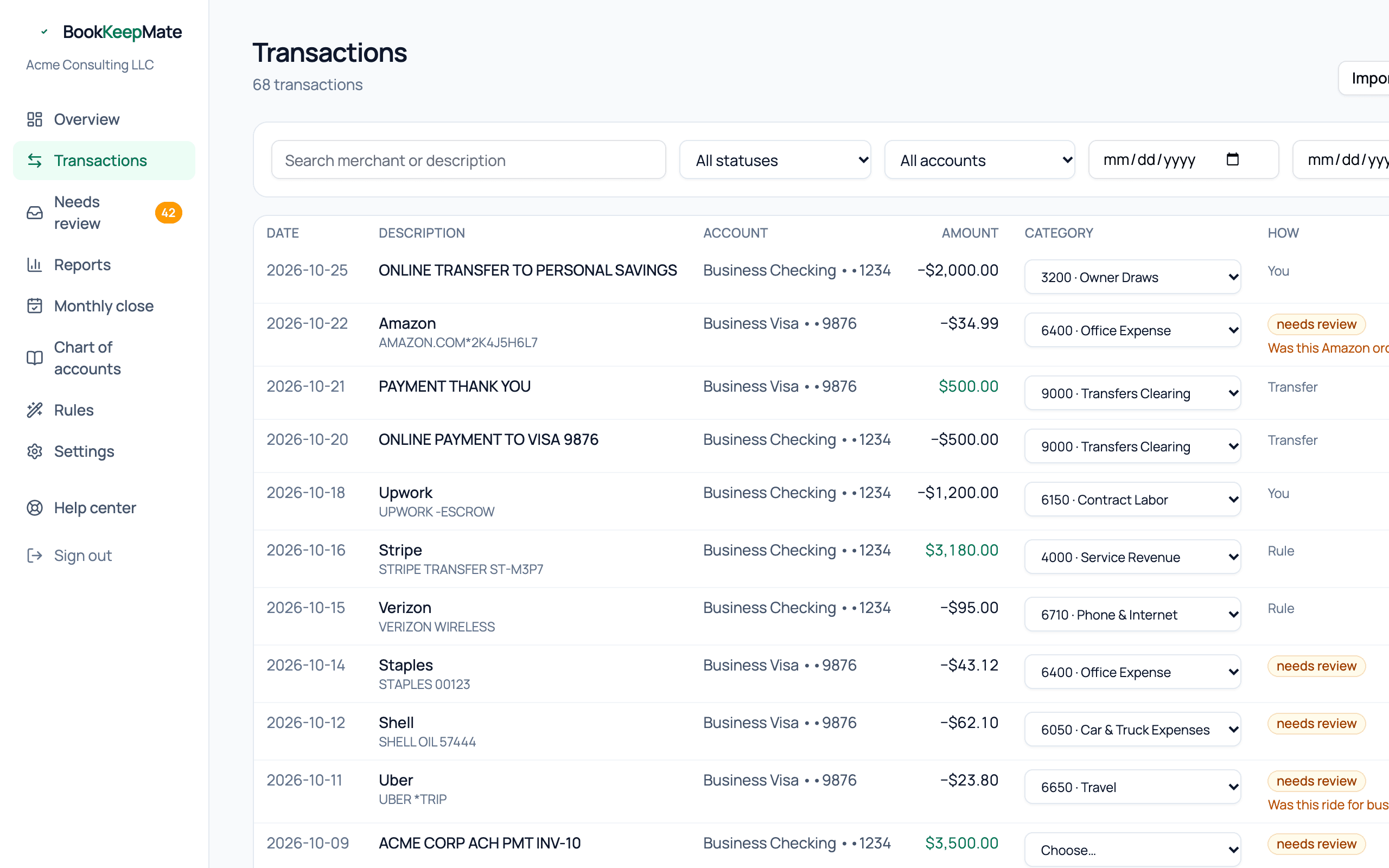
Finding a transaction

- Search matches the merchant or the bank's description — try "google", "check 1042", or an amount's merchant.
- Status — Posted, Needs review, Excluded, or Uncategorized (just arrived, not yet run through categorization).
- Account — one bank or card account.
- From / To — a date range. Reports link here with the range pre-filled, so you can click from a P&L line to its transactions.
Reading a row

- Description
- The merchant name on top, the bank's raw description underneath. A pending badge means the bank hasn't settled it yet; it will be replaced by the final charge automatically, keeping its category.
- Amount
- Green for money in, dark for money out.
- Category
- A dropdown. Change it and the new category saves immediately.
- How
- Who decided the category: Transfer, Rule, Learned (from one of your corrections), AI 93% (the model and its confidence), or You. Hover for the one-line reasoning.
Changing a category
Pick a new category in the row's dropdown. Behind the scenes the old entry is reversed and a new one posted, so the audit trail is intact. We also remember the merchant, so the next charge from them gets your category automatically.
Personal
Marks the transaction as not business. Money out becomes an Owner Draw, money in an Owner Contribution. It stays in the books (your bank balance has to reconcile) but never touches income, expenses or the tax summary.
Exclude
Removes the transaction from the books entirely. Use it for duplicates, something charged to the wrong account by mistake, or activity before your books start date that slipped through. Excluded rows stay visible, greyed out, with the reason.
Import a statement
The button at the top right opens the CSV import for accounts Plaid can't reach or history older than your connection. Details in Bank connections and statement import.