Reports & taxes
Schedule C and tax set-aside
Two things make tax time painless: a Schedule C summary your preparer can work from directly, and knowing all year how much to set aside so there is no April surprise.
The Schedule C summary
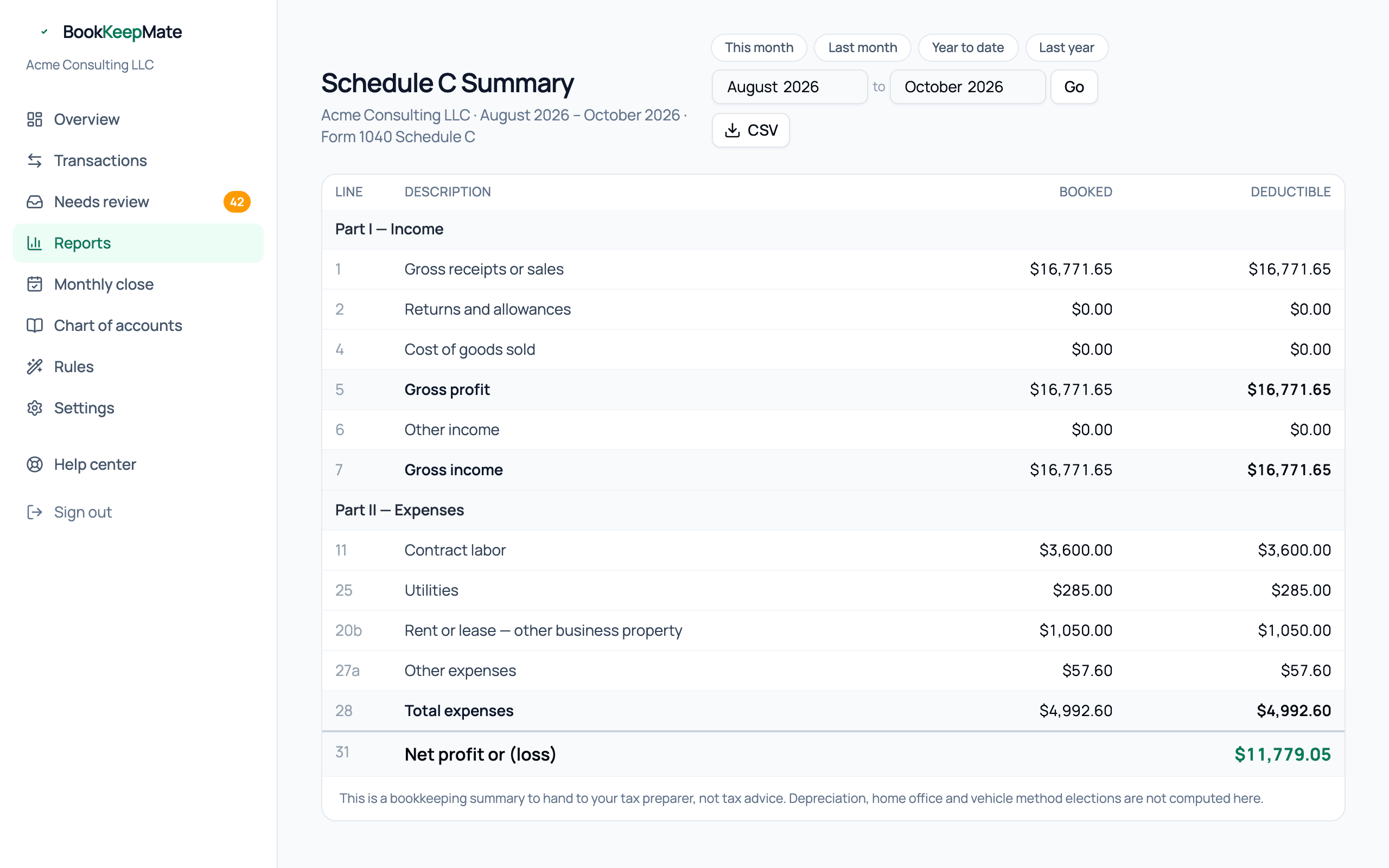
Open Reports → Schedule C Summary and pick Last year (or year to date mid-year). Each expense category in your chart of accounts maps to a line on IRS Form 1040 Schedule C, so the report reads like the form:
- Part I — gross receipts (line 1), returns (2), cost of goods sold (4), other income (6), gross income (7).
- Part II — expenses by line: advertising (8), car and truck (9), contract labor (11), insurance (15), office (18), rent (20), supplies (22), travel (24a), meals (24b), utilities (25), other (27a) and the rest.
- Line 28 / 31 — total expenses and net profit.
The Booked column is what you spent; Deductible applies the limits we know about — currently the 50% rule on meals. Expenses that belong elsewhere on your return (owner health insurance) are listed separately underneath so nothing is forgotten.
Handing it to your preparer
- Make sure every month of the year is closed so the numbers won't move.
- On the Reports page, set the period to the tax year and download the Schedule C, P&L, Balance sheet and Trial balance CSVs.
- Send them along with your 1099s and any receipts for large equipment purchases.
If your preparer wants something in a different shape, the General ledger export has every line and they can build anything from it.
The tax set-aside estimate

The dashboard card estimates the tax on your profit so far this year, using 2025 federal rates:
- Self-employment tax — 15.3% on 92.35% of net profit (Social Security up to the annual wage base, Medicare without a cap). Not applied for S corporations, where payroll handles it.
- Federal income tax — net profit, less half the SE tax, less the 20% qualified business income deduction, less the standard deduction for your filing status, run through the brackets.
- State — a flat percentage you set in Settings. Leave it at zero in a no-income-tax state.
The percentage shown ("about 22% of profit") is the practical number: move that share of each payment you receive into a savings account and the estimate takes care of itself. The card also shows the next quarterly estimated-payment date (April 15, June 15, September 15, January 15).
Tuning it
In Settings → Business details, set your filing status (single, married filing jointly, head of household) and state income tax rate. Both only affect the estimate, not the books.