Every day
Review inbox
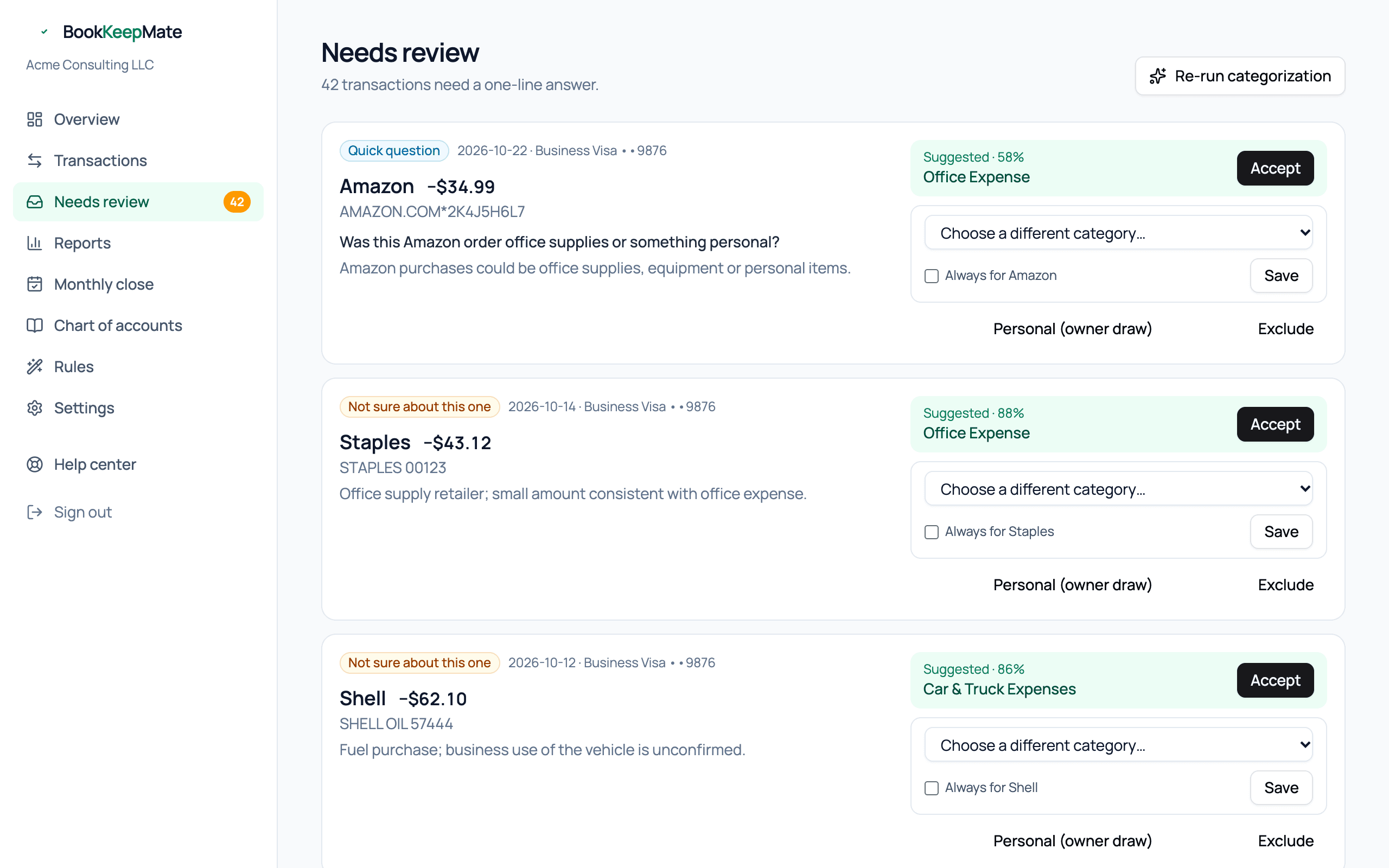
This is the only screen that ever needs you. Each card is one transaction the system wasn't sure about, with its best guess pre-filled. Most take five seconds.
Why something lands here
The badge on each card tells you:
- Quick question
- The model had a specific question — usually "business or personal?" or "client meal or travel?". Answer it by choosing the category that matches.
- Not sure about this one
- A suggestion exists but confidence was under the bar. Accept it or pick another.
- Large amount — please confirm
- Anything $5,000 or more always gets a human look, however obvious.
- Owner or tax account — please confirm
- The suggestion is an equity or tax account (owner draw, owner contribution, sales tax). Those never post automatically.
- Could not categorize
- No usable suggestion — typically a bare "CHECK 1042" with no merchant. Tell us what it was.
Anatomy of a card
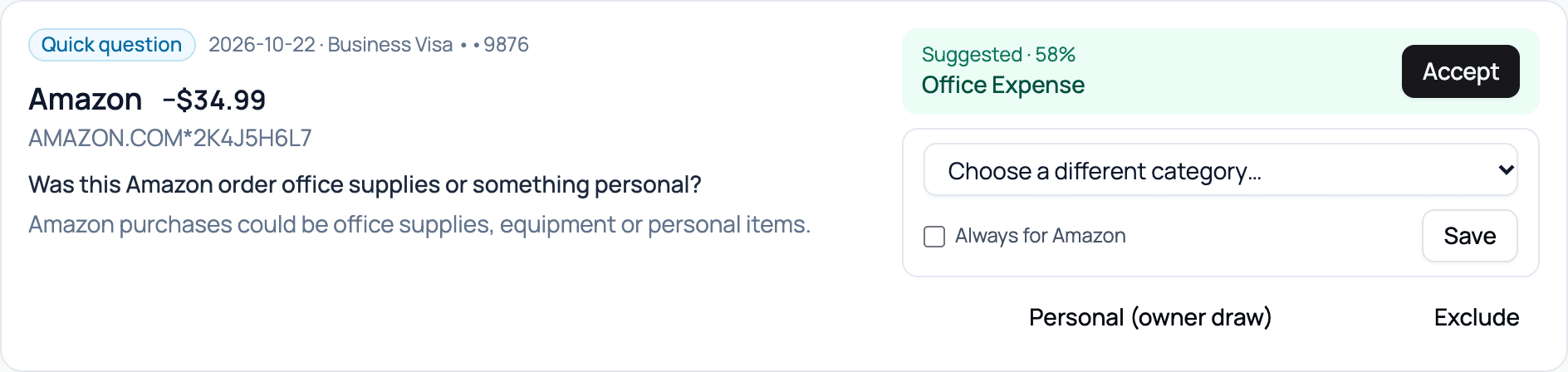
- Left: date, account, merchant, amount, the bank's raw description, the question (if any), and the model's one-line reasoning.
- Accept — posts the suggested category. Use it when the guess is right.
- Choose a different category… — pick the right one and Save. Categories are grouped by type and ordered so the likely ones are on top.
- Always for [merchant] — tick this before saving and we create a rule, so every future charge from that merchant posts without asking. It also sweeps any other open items from the same merchant.
- Personal (owner draw / owner contribution) — it wasn't a business transaction. Money out becomes an owner draw, money in an owner contribution. Neither touches your profit.
- Exclude — keep it out of the books entirely (duplicates, something that isn't yours).
Choosing the right category
You don't need accounting knowledge; pick the plain-English name that fits. A few that trip people up:
- Paying off the business credit card from checking — this is a transfer, and it's normally matched automatically. If you see it here, both accounts probably aren't connected; choose Transfers Clearing.
- Loan payments — the principal goes to Loans Payable, the interest to Interest Expense. If the bank doesn't split it, pick Loans Payable and your accountant can adjust at year end.
- Refunds from a vendor — same category as the original purchase (it reduces that expense). Refunds to a customer — Refunds & Returns.
- Equipment over about $2,500 (a laptop, a camera) — Equipment & Fixed Assets, not Office Expense; it's depreciated rather than expensed.
- Meals — only business meals (with a client, or while traveling) go to Meals; lunch at your desk is Personal.
- Health insurance for yourself — Health Insurance (Owner); it's deductible, but on your 1040, not Schedule C, so we keep it separate.
Tip: When in doubt, pick your best guess and move on. Every choice is reversible from the Transactions page, and your accountant reviews the summary at year end anyway. An empty inbox beats a perfect one.
Re-run categorization
The button at the top re-runs the cascade over anything uncategorized. Use it after you've added rules, so the new rules are applied before you work through the rest by hand.
The email digest
While the inbox has items, you get at most one email a day listing them, with a link straight here. Clear the inbox and the emails stop. See Emails you will receive.