Setup
Chart of accounts
The chart of accounts is the list of categories your books use. You start with about forty, already mapped to tax lines, and most businesses never need to touch it. Here's what's there and how to change it when you do.
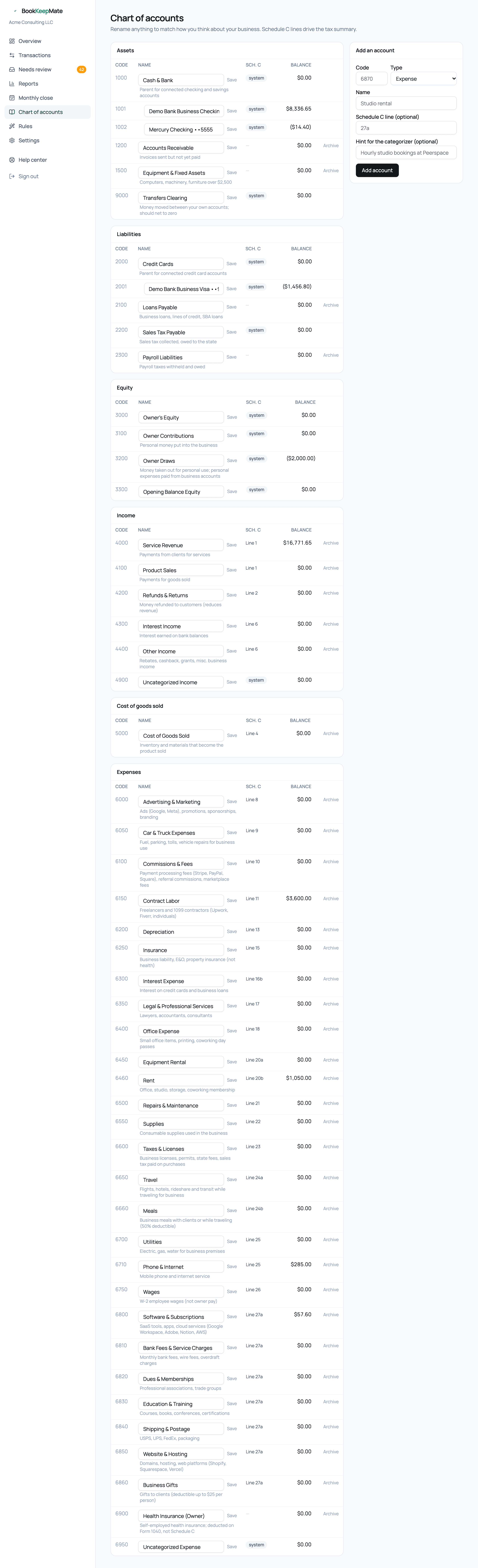
The six groups
- Assets (1xxx)
- What the business owns: each connected checking or savings account gets its own line under Cash & Bank; plus Accounts Receivable, Equipment, and the Transfers Clearing account.
- Liabilities (2xxx)
- What it owes: each credit card under Credit Cards, loans, sales tax and payroll liabilities.
- Equity (3xxx)
- Owner's equity, contributions and draws. Money between you and the business.
- Income (4xxx)
- Service revenue, product sales, refunds, interest and other income.
- Cost of goods sold (5xxx)
- Inventory and materials that become the product you sell. Only relevant if you sell goods.
- Expenses (6xxx)
- Everything else, one account per Schedule C line, from Advertising to Website & Hosting.
The Sch. C column shows which IRS line an account feeds; system marks accounts the software relies on (bank accounts, clearing, owner equity, uncategorized) which can be renamed but not archived.
Renaming an account
Click into the name, change it, press Save. Reports and the review inbox pick up the new name immediately. Rename to match how you think about your spending — "Software & Subscriptions" can become "SaaS tools" — the tax mapping stays.
Adding an account
- Pick a 4-digit code in the right range (6xxx for expenses) that isn't taken.
- Choose the type and a plain name.
- Set the Schedule C line so it rolls into the tax summary (27a "Other expenses" is the safe default).
- Add a hint — a sentence describing what belongs there. The categorizer reads it, so "Hourly studio bookings at Peerspace" makes future Peerspace charges land correctly.
Archiving
Archive hides an account from the pickers and stops new transactions landing in it; existing history stays in reports. Restore brings it back. System accounts can't be archived.
Bank accounts in the chart
When you connect a bank, each account gets its own ledger account automatically — "Chase Business Checking ••1234" under Cash & Bank, "Ink Business Cash ••9876" under Credit Cards — so the balance sheet shows them separately. You don't create these by hand. See Bank connections.